Our vehicles have a lot of features that might not be directly visible but we know many of you want to just get in and drive. The basics are pretty much the same as most cars. WASD or arrows for direction and PGUp and PGDown to shift. If you use our HUD, all the important features will be right at the tip of your mouse. So here is the quick start method for the learn as you go drivers:
TIP FOR MOUSELOOK DRIVERS: When driving in mouselook, if you need to access the HUD, or any of the dash controls, hold down the alt key. This temporarily allows you to move and click the mouse to access normal parts of the interface. If the car is moving, be sure cruise control is engaged otherwise the car will slow to a stop.
The Starland Driver HUD is included with all Generation 2 Starland vehicles. The same HUD may be used across all cars that have been sold or upgraded to Generation 2. For Generation 1 cars, please use the HUD that came with the car.
The HUD retrieves information from the car for it’s settings, so the same instance of the HUD can be used for any compatible vehicle.
The HUD is also transferable to allow guest drivers to benefit from the HUD.
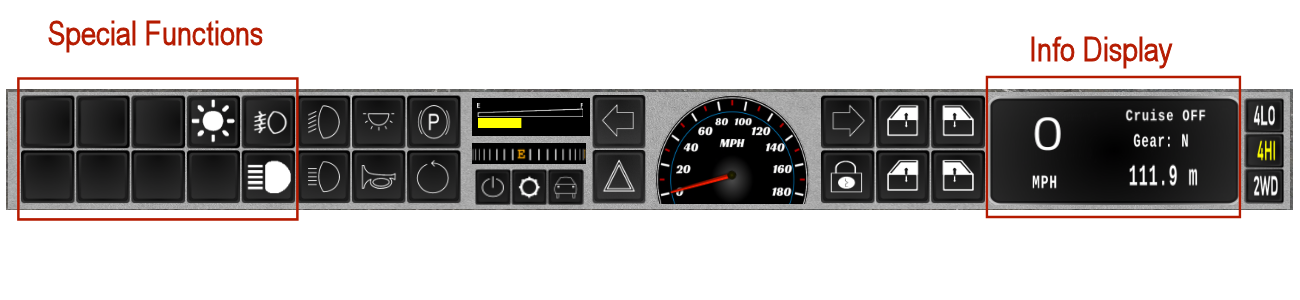
Special Functions
The buttons in this area will vary based on the model vehicle in use. These will be related to special features of the particular model. Consult the user guide for your car for specific details.
Info Display
Shows current speed, cruise on or off status, selected gear and odometer reading. Units for speedometer and odometer are in Imperial (miles, miles per hour) units, but can be switched to Metric from the Settings menu. If the car you are driving is set to KPH, it will switch automatically when seated. “Cruise On/Off” line also functions as a switch to turn cruise control on or off.
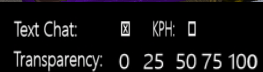
Settings menu is accessed from the gear shaped button on the HUD. This menu changes some characteristics on how the HUD operates. There are three settings:
Most Starland vehicles use the same set of commands and gestures. Many functions can be accessed from several different places. Below shows each function and where it is located on either a gesture (function key), command or menu. The commands also require the Starland Gestures to be active. To use commands without the gestures, enter them on channel 1087. Example: /1087 REMOTESTART.
Opens HUD settings menu
Touch car roof or center mirror also gets car menu.
Touch Starland medallion on left side of most cars to lock/unlock.
Bottom row controls rear window or tailgate window.
Bottom row controls rear window.
Touching "Cruise" text on HUD also toggles cruise.
Best for rough steep hils. Low speed, high torque
Mainland with moderate hills and turns. Default mode for SUV's and pickups.
City streets and flat land. Default mode for sedans and coupes.
Returns car to upright position.
Honk the horn
Use to prevent rolling when stopped on a hill. Disables whenhitting forward.
Wipers on equipped cars are 2-speed.
Turns on headlights and running lights.
Toggles high beam lights. Works only while headlights are on.
Interior light also comes on when door is open.
Available on select vehicles.
Starland vehicles have many customization options. While we strive to create the most optimized vehicles for your needs, we understand that there are many different tastes and requirements for our customers. For this reason, all Starland vehicles are modifiable (except for most scripts). Our scripting engine also includes a customizable configuration script so that you can adjust many of the settings for function and operation to suit your own driving needs.
While we understand that making these changes in a script rather than a notecard can be a bit intimidating. However we found through experience that the loading of a notecard takes considerably longer than that of a script. The configuration script is heavily commented and with a little patience, making the mostly simple changes should be a breeze!
Your car will have one of two configuration scripts depending on the release time:
The content of the scripts are basically the same, however, the layout and order is different between the two. This list is based on GEN2 options. Many of these will not exist on older GEN1 cars which are slowly being upgraded to GEN2.
The table below lists the most frequently changed values, including those customized by Starland. Please refer to script comments for less frequently changed items.
If ON, headlights turn off when driver exits the vehicle. OFF means headlights do not turn off automatically. Default is ON for most cars, OFF for emergency services vehicles.
1 = turn signals turn on and off based on steering wheel position, 0 = Signals must be manually controlled. Default is 1.
1 = turn signals cancel when completing turn. Has no effect if AutoSignal is on.
0 = Imperial (miles) on speedometer and odometer. 1 = Kilometers. Not available on all vehicles. Default is 0 (miles).
0 = doors locked if car is locked when vehicle is rezzed and locked. 1 = Doors unlocked.
1 = Backup camera enabled. When car is put into reverse, driver view will be facing the rear of the car. 0 disables backup camera. Default is 1.
1 = Only owner can drive. 0 = Anyone can drive. Default is 1 (only owner). This can be temporarily switched from the car menu.
1 = Engine needs to be started manually. 0 = Engine starts when authorized driver sits.
0 = Car rezzes in manual (“stick”) shift mode. 1 = Automatic transmission on rez.
2WD: Best mode for city driving (tight turns, minimum hills). Default for sedans and coupes.
4HI: Best mode for open road driving with some degree of hills. Default for pickups and SUVs.
4LO: Best when getting caught in rough terrain. High torque, slow movement.
Syncs cabin LED lighting intensity with the rhythm of the active media source.